Scatter Plots & Relationships

What we learned so far

Recap

  • We learned how to visualize the distribution of one continuous variable.

  • Histogram: groups data into bins, counts how many observations fall in each bin.

  • Density plot: estimates a smooth curve representing the distribution.

  • We also learned how to compare distributions across groups (e.g., income by gender).

But what if we want to ask a different kind of question?

“Is there a relationship between two variables?”

New Question

  • In Week 3 we asked: “How is income distributed?” → one variable.

  • This week we ask: “Does income inequality relate to hate crime rates?”two variables.

  • When we want to see the relationship between two continuous variables, we use a scatter plot.

When to use a scatter plot?

  • You have two continuous variables.

  • You want to see if there is a pattern, trend, or correlation between them.

  • Each observation (row) becomes one point on the plot.

  • The x axis shows one variable, the y axis shows the other.

Our Data: Hate Crimes in the US

The Data

  • Our data comes from a FiveThirtyEight article:

    • “Higher Rates Of Hate Crimes Are Tied To Income Inequality”
  • It contains data on all 50 US states.

  • For each state we have:

    • hate_crimes_fbi: hate crimes per 100,000 people (reported to FBI)
    • gini_index: a measure of income inequality (higher = more unequal)
    • median_income: median household income
    • highschool: share of population with a high school degree
    • unemployment: share of unemployed population
    • trump_vote: share of voters who voted for Trump in 2016
    • region: US Census region (Northeast, Midwest, South, West)

Read the data

library(tidyverse)
library(janitor)
library(ggthemes)
read.csv("https://raw.githubusercontent.com/mucahitzor/IKT2010/refs/heads/main/data/hate_crimes.csv") %>%
  as_tibble() -> hate_crimes
1
Use the tidyverse, janitor, and ggthemes libraries
2
Read the CSV file and then do the following ( %>% )
3
Show it as a tibble and save it as hate_crimes

Have a look at the data

hate_crimes
# A tibble: 50 × 13
   state             median_income unemployment metro_pop highschool non_citizen
   <chr>                     <int>        <dbl>     <dbl>      <dbl>       <dbl>
 1 Alabama                   42278        0.06       0.64      0.821        0.02
 2 Alaska                    67629        0.064      0.63      0.914        0.04
 3 Arizona                   49254        0.063      0.9       0.842        0.1 
 4 Arkansas                  44922        0.052      0.69      0.824        0.04
 5 California                60487        0.059      0.97      0.806        0.13
 6 Colorado                  60940        0.04       0.8       0.893        0.06
 7 Connecticut               70161        0.052      0.94      0.886        0.06
 8 Delaware                  57522        0.049      0.9       0.874        0.05
 9 District of Colu…         68277        0.067      1         0.871        0.11
10 Florida                   46140        0.052      0.96      0.853        0.09
# ℹ 40 more rows
# ℹ 7 more variables: white_poverty <dbl>, gini_index <dbl>, non_white <dbl>,
#   trump_vote <dbl>, hate_crimes_splc <dbl>, hate_crimes_fbi <dbl>,
#   region <chr>

Understanding Our Data

What are our variables?

hate_crimes %>%
  summary()
    state           median_income    unemployment       metro_pop     
 Length:50          Min.   :35521   Min.   :0.02800   Min.   :0.3100  
 Class :character   1st Qu.:48358   1st Qu.:0.04225   1st Qu.:0.6300  
 Mode  :character   Median :54613   Median :0.05100   Median :0.7900  
                    Mean   :54904   Mean   :0.04988   Mean   :0.7500  
                    3rd Qu.:60653   3rd Qu.:0.05775   3rd Qu.:0.8975  
                    Max.   :76165   Max.   :0.07300   Max.   :1.0000  
                                                                      
   highschool      non_citizen      white_poverty      gini_index    
 Min.   :0.7990   Min.   :0.01000   Min.   :0.0400   Min.   :0.4190  
 1st Qu.:0.8397   1st Qu.:0.03000   1st Qu.:0.0800   1st Qu.:0.4400  
 Median :0.8740   Median :0.04000   Median :0.0900   Median :0.4545  
 Mean   :0.8684   Mean   :0.05404   Mean   :0.0922   Mean   :0.4542  
 3rd Qu.:0.8978   3rd Qu.:0.08000   3rd Qu.:0.1000   3rd Qu.:0.4667  
 Max.   :0.9180   Max.   :0.13000   Max.   :0.1700   Max.   :0.5320  
                  NA's   :3                                          
   non_white        trump_vote     hate_crimes_splc  hate_crimes_fbi  
 Min.   :0.0600   Min.   :0.0400   Min.   :0.06745   Min.   : 0.2669  
 1st Qu.:0.1925   1st Qu.:0.4200   1st Qu.:0.14271   1st Qu.: 1.2931  
 Median :0.2750   Median :0.4950   Median :0.22620   Median : 1.9871  
 Mean   :0.3058   Mean   :0.4938   Mean   :0.30409   Mean   : 2.3676  
 3rd Qu.:0.4200   3rd Qu.:0.5775   3rd Qu.:0.35693   3rd Qu.: 3.1843  
 Max.   :0.6300   Max.   :0.7000   Max.   :1.52230   Max.   :10.9535  
                                   NA's   :3                          
    region         
 Length:50         
 Class :character  
 Mode  :character  


Understanding Our Data

Non-numeric variable: region

hate_crimes %>%
  tabyl(region)
    region  n percent
   Midwest 12    0.24
 Northeast  9    0.18
     South 17    0.34
      West 12    0.24
  • We have 4 regions, each with a different number of states.

Our Goal Today

Is there a relationship between income inequality and hate crimes?

  • gini_index measures income inequality. Higher values = more inequality.

  • hate_crimes_fbi measures hate crimes per 100,000 people.

  • We want to see: do states with more inequality also have more hate crimes?

  • Both variables are continuous → we need a scatter plot.

Building a Scatter Plot Step by Step

Step 1: Start with the data

Take our data set named hate_crimes,

hate_crimes

I want to make a visualization, take my data set and apply ggplot.

hate_crimes %>%
  ggplot()

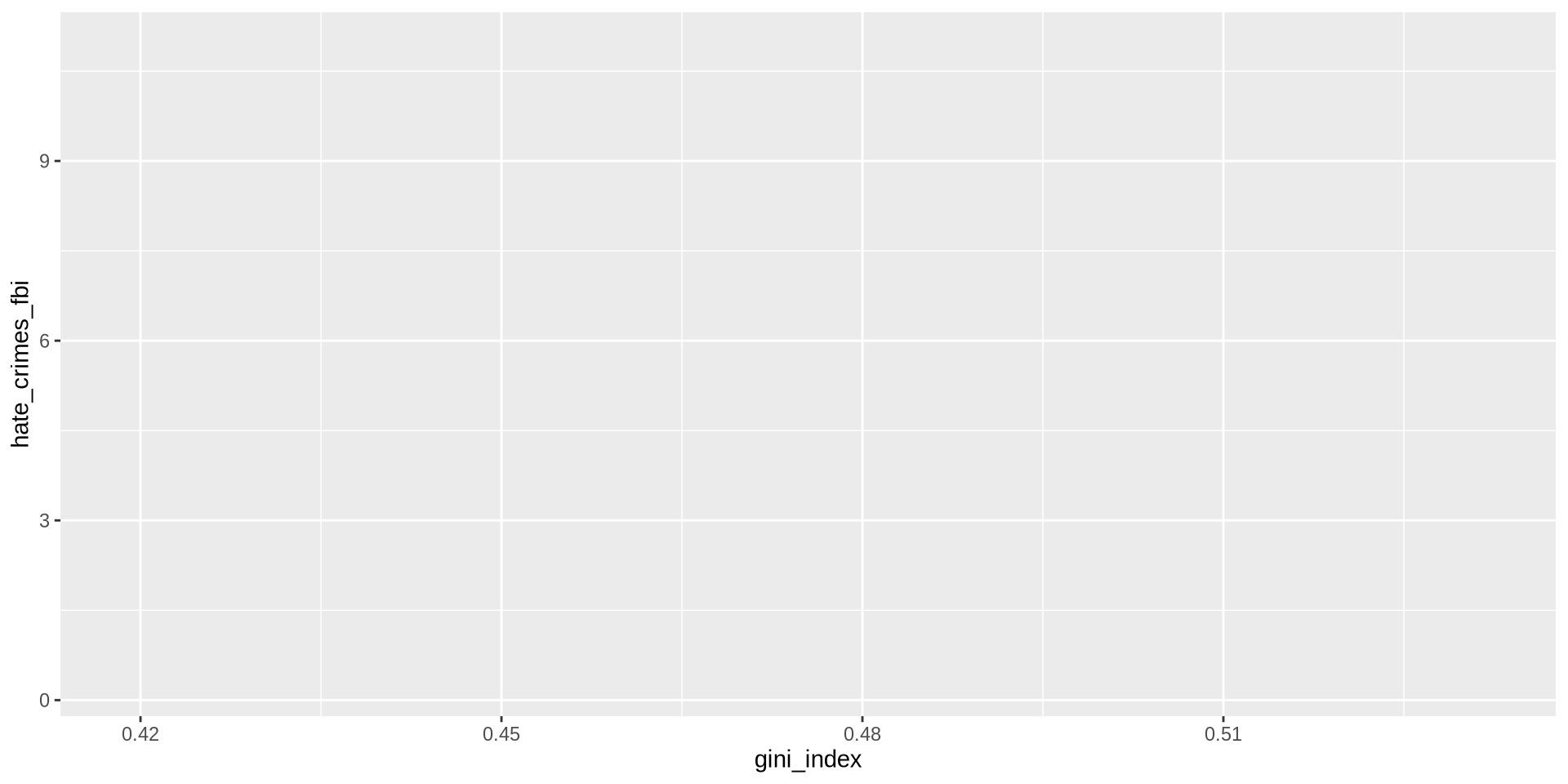
Step 2: Set the axes

Now we need to tell R what goes on the x axis and what goes on the y axis.

For scatter plots we need both x and y inside aes().

  • x = gini_index (income inequality)
  • y = hate_crimes_fbi (hate crimes per 100k)
hate_crimes %>%
  ggplot() +
  aes(x = gini_index, y = hate_crimes_fbi)

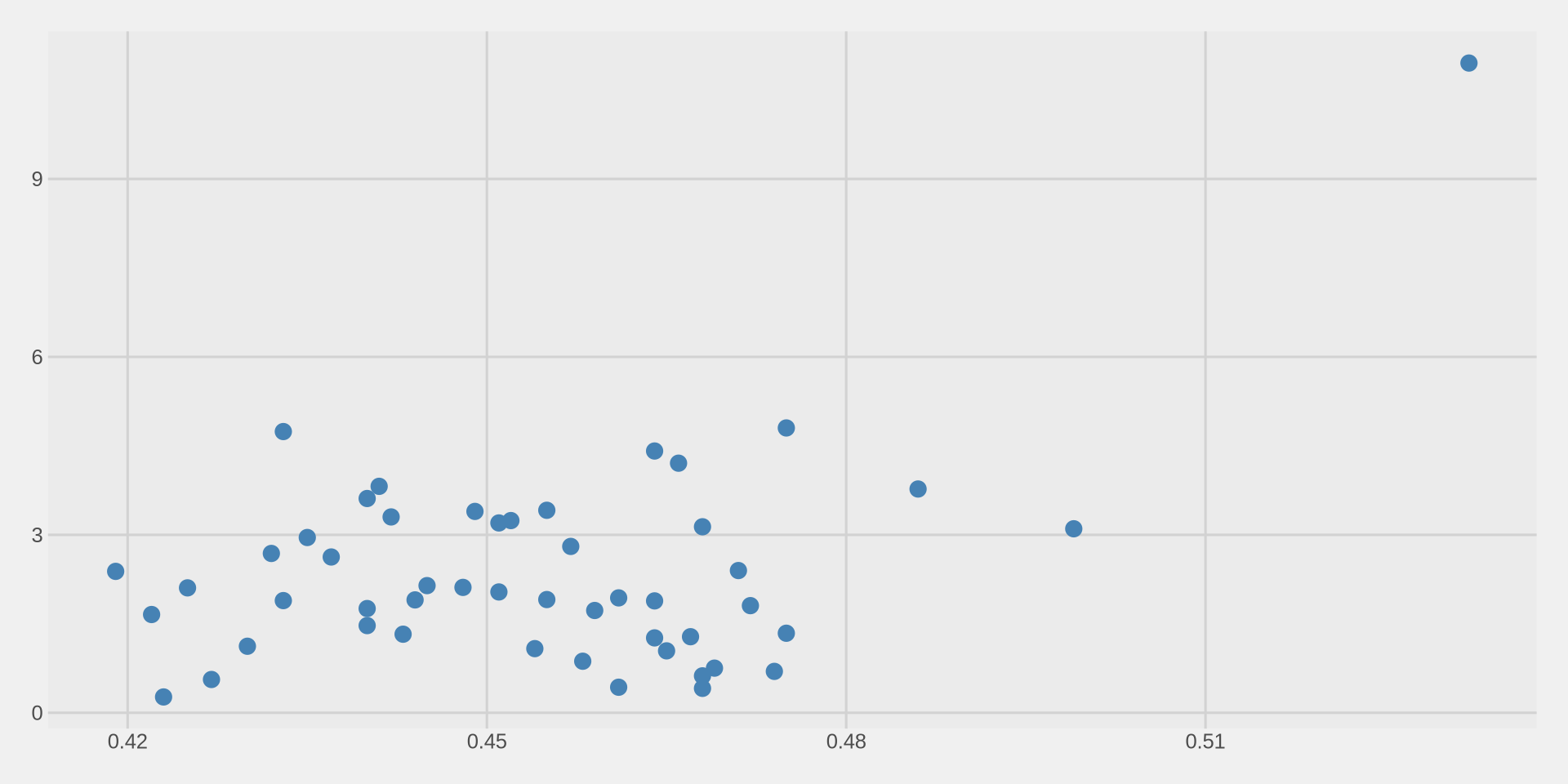
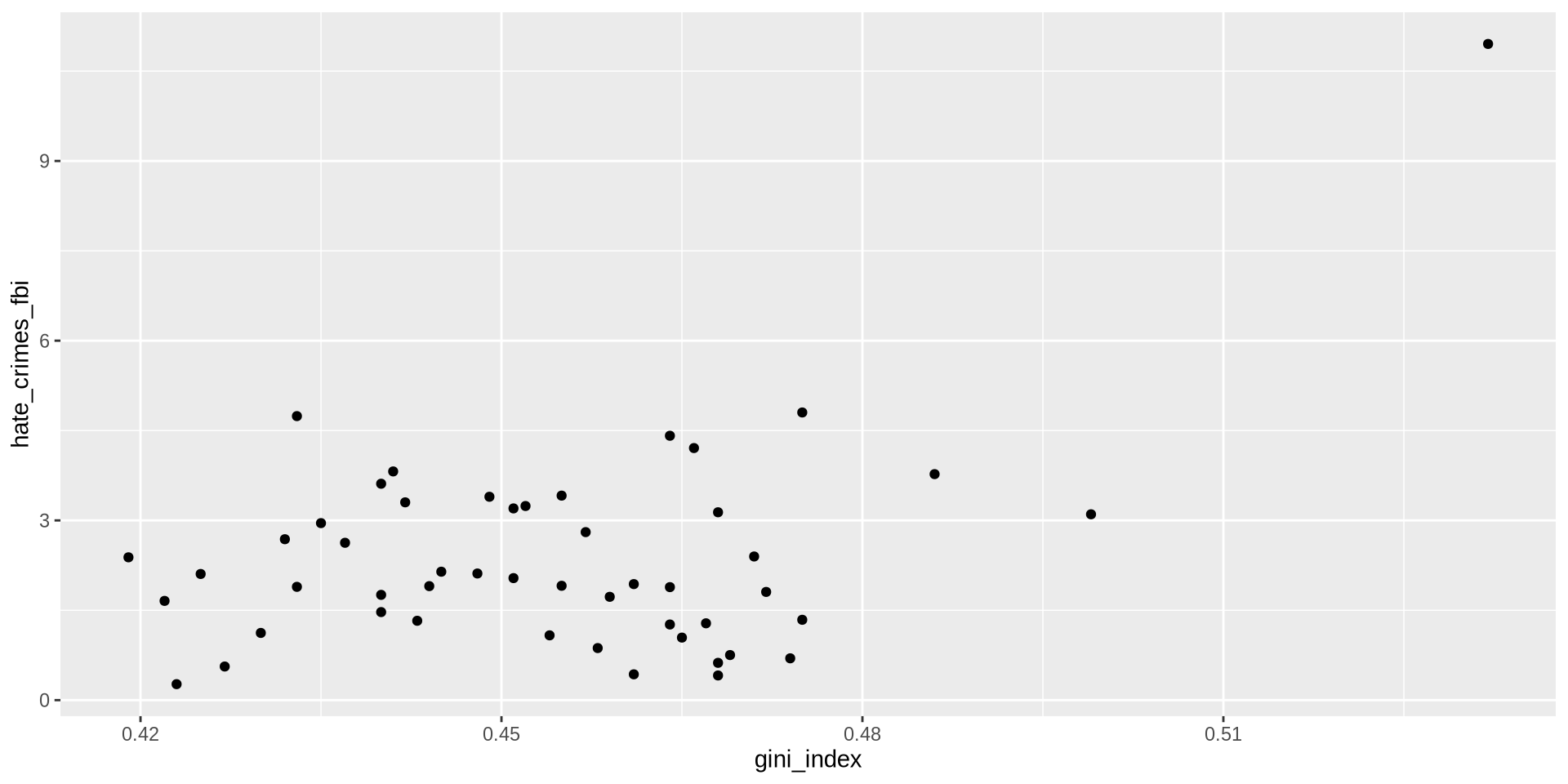
Step 3: Add the points

Remember, for histograms we used geom_histogram(), for density we used geom_density().

For scatter plots we use geom_point().

Each row in our data becomes one point on the plot.
hate_crimes %>%
  ggplot() +
  aes(x = gini_index, y = hate_crimes_fbi) +
  geom_point()

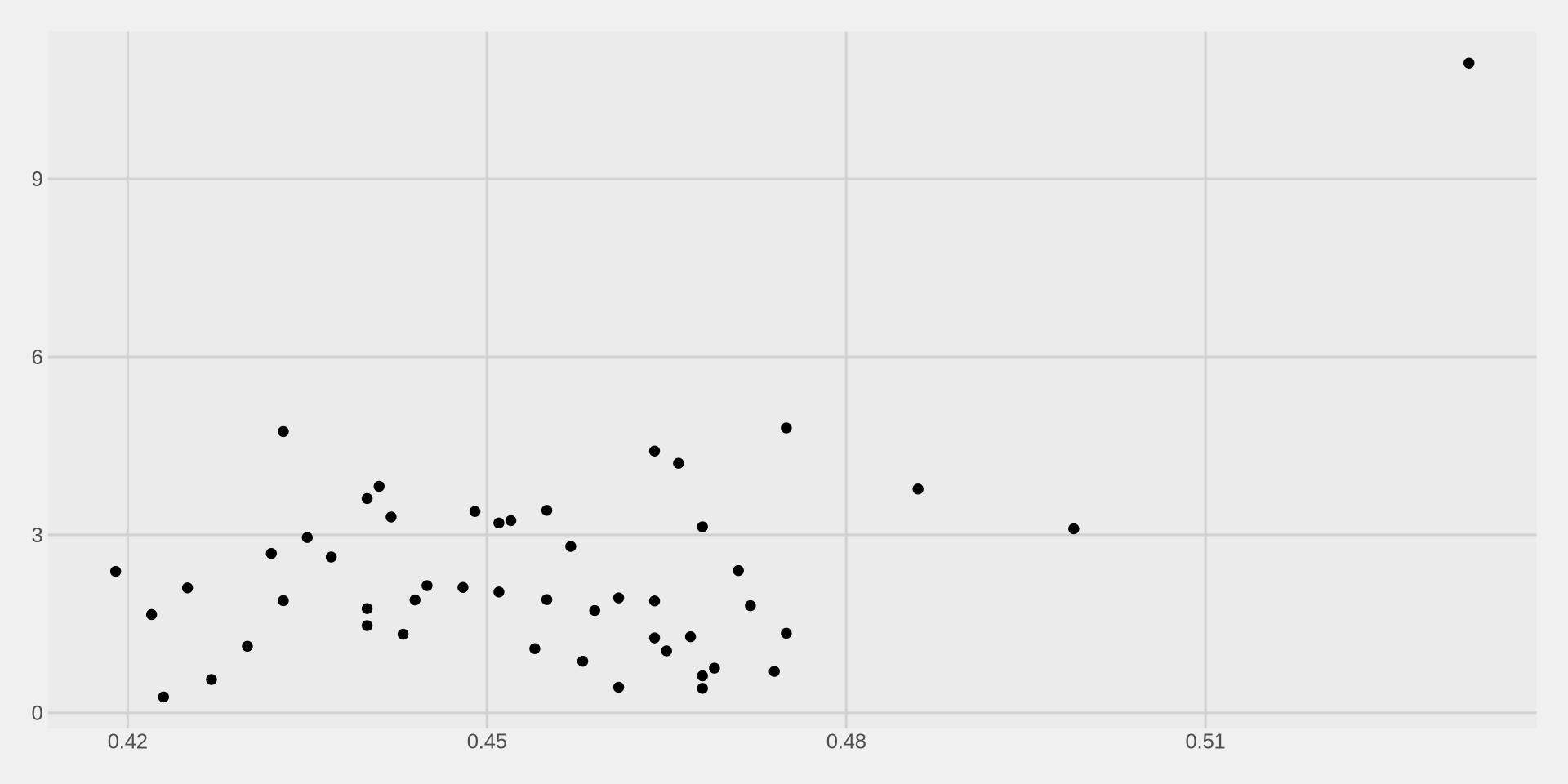
Step 4: Add a theme

Lets immediately clean it up with a theme.
hate_crimes %>%
  ggplot() +
  aes(x = gini_index, y = hate_crimes_fbi) +
  geom_point() +
  theme_fivethirtyeight()

Step 5: Customize the points

The default points are small and hard to see. We can change them inside geom_point():

  • size = how big the points are (default is about 1.5)
  • color = the color of the points
hate_crimes %>%
  ggplot() +
  aes(x = gini_index, y = hate_crimes_fbi) +
  geom_point(size = 3, color = "steelblue") +
  theme_fivethirtyeight()

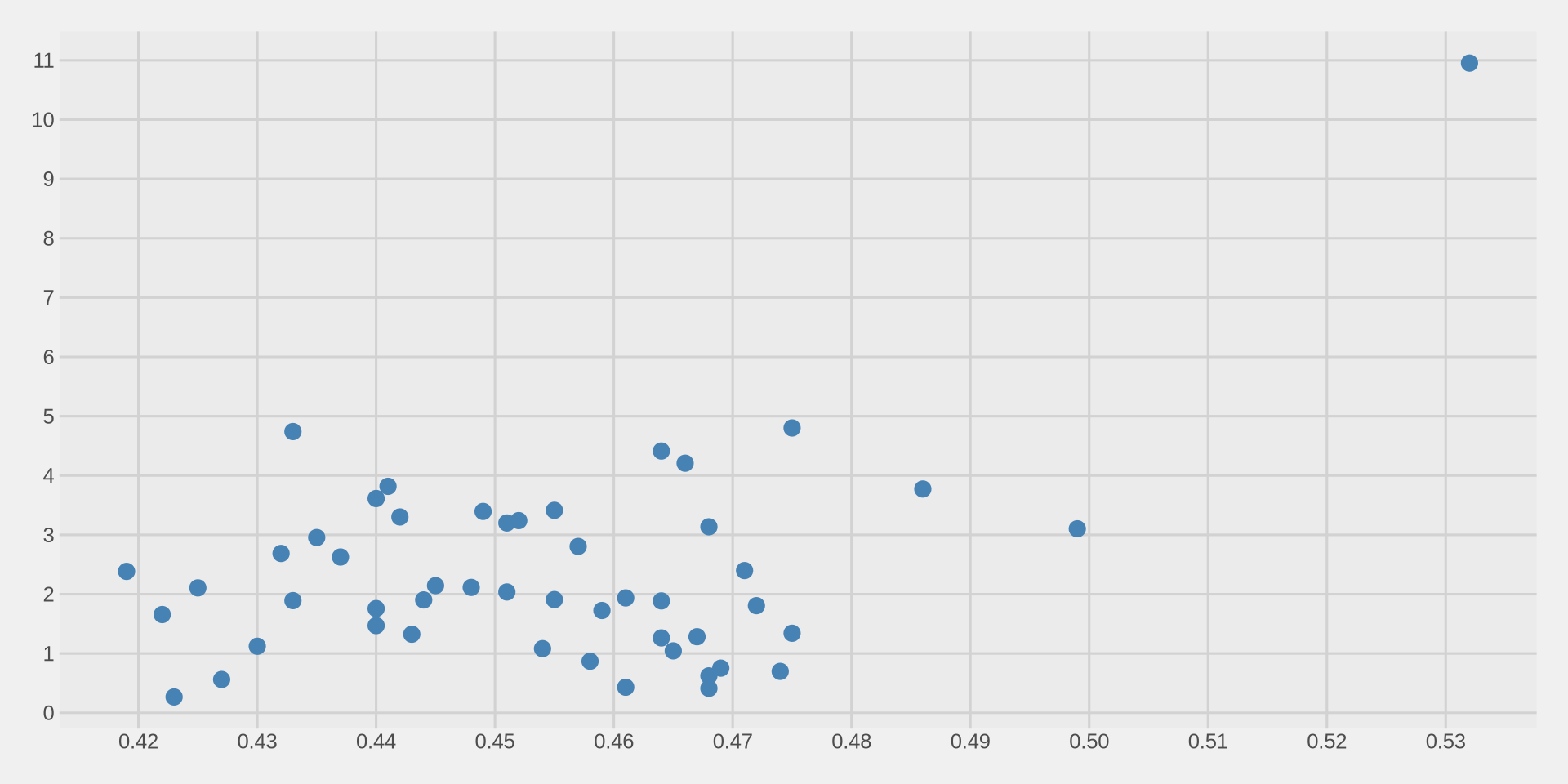
Step 6: Fix the axes

Like in Week 3, lets increase the number of values on both axes.
hate_crimes %>%
  ggplot() +
  aes(x = gini_index, y = hate_crimes_fbi) +
  geom_point(size = 3, color = "steelblue") +
  scale_x_continuous(n.breaks = 10) +
  scale_y_continuous(n.breaks = 10) +
  theme_fivethirtyeight()

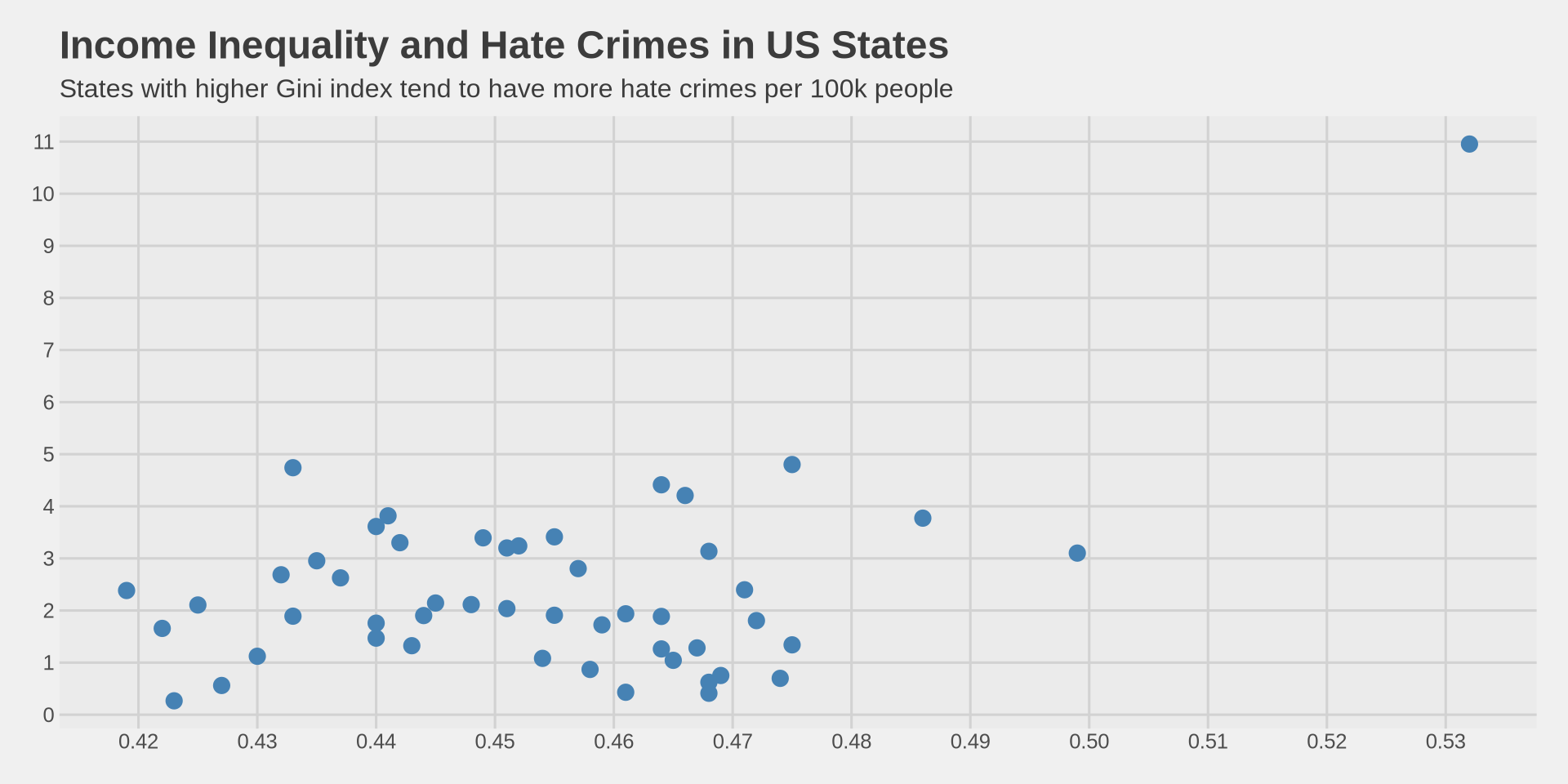
Interpreting the scatter plot

  • What do we see?

    • As gini_index increases (more inequality), hate crimes tend to increase too.
    • This suggests a positive relationship between income inequality and hate crimes.
  • But not all states follow this pattern perfectly.

    • Some states have high inequality but low hate crimes.
    • Some states have low inequality but high hate crimes.
    • This is normal — we are looking at a trend, not a perfect rule.
  • There is one point very high up — can you guess which state that might be?

hate_crimes %>% filter(hate_crimes_fbi > 10)
# A tibble: 1 × 13
  state              median_income unemployment metro_pop highschool non_citizen
  <chr>                      <int>        <dbl>     <dbl>      <dbl>       <dbl>
1 District of Colum…         68277        0.067         1      0.871        0.11
# ℹ 7 more variables: white_poverty <dbl>, gini_index <dbl>, non_white <dbl>,
#   trump_vote <dbl>, hate_crimes_splc <dbl>, hate_crimes_fbi <dbl>,
#   region <chr>

Add labels

Now lets add a title, subtitle, and axis labels using labs().

hate_crimes %>%
  ggplot() +
  aes(x = gini_index, y = hate_crimes_fbi) +
  geom_point(size = 3, color = "steelblue") +
  scale_x_continuous(n.breaks = 10) +
  scale_y_continuous(n.breaks = 10) +
  labs(
    title = "Income Inequality and Hate Crimes in US States",
    subtitle = "States with higher Gini index tend to have more hate crimes per 100k people",
    x = "Gini Index (Income Inequality)",
    y = "Hate Crimes per 100,000 (FBI)"
  ) +
  theme_fivethirtyeight()
Add labels

Coloring Points by a Group

Color by region

  • Remember in Week 3 we changed the color of density lines based on gender?

  • We can do the same thing here: color the points based on region.

  • Since region is a variable, we put it inside aes(), not inside geom_point().

Can you guess the code?

Color by region

We move color from geom_point(color = "steelblue") to aes(color = region):

hate_crimes %>%
  ggplot() +
  aes(x = gini_index, y = hate_crimes_fbi, color = region) +
  geom_point(size = 3) +
  scale_x_continuous(n.breaks = 10) +
  scale_y_continuous(n.breaks = 10) +
  labs(
    title = "Income Inequality and Hate Crimes in US States",
    subtitle = "Colored by US Census region",
    x = "Gini Index (Income Inequality)",
    y = "Hate Crimes per 100,000 (FBI)"
  ) +
  theme_fivethirtyeight()

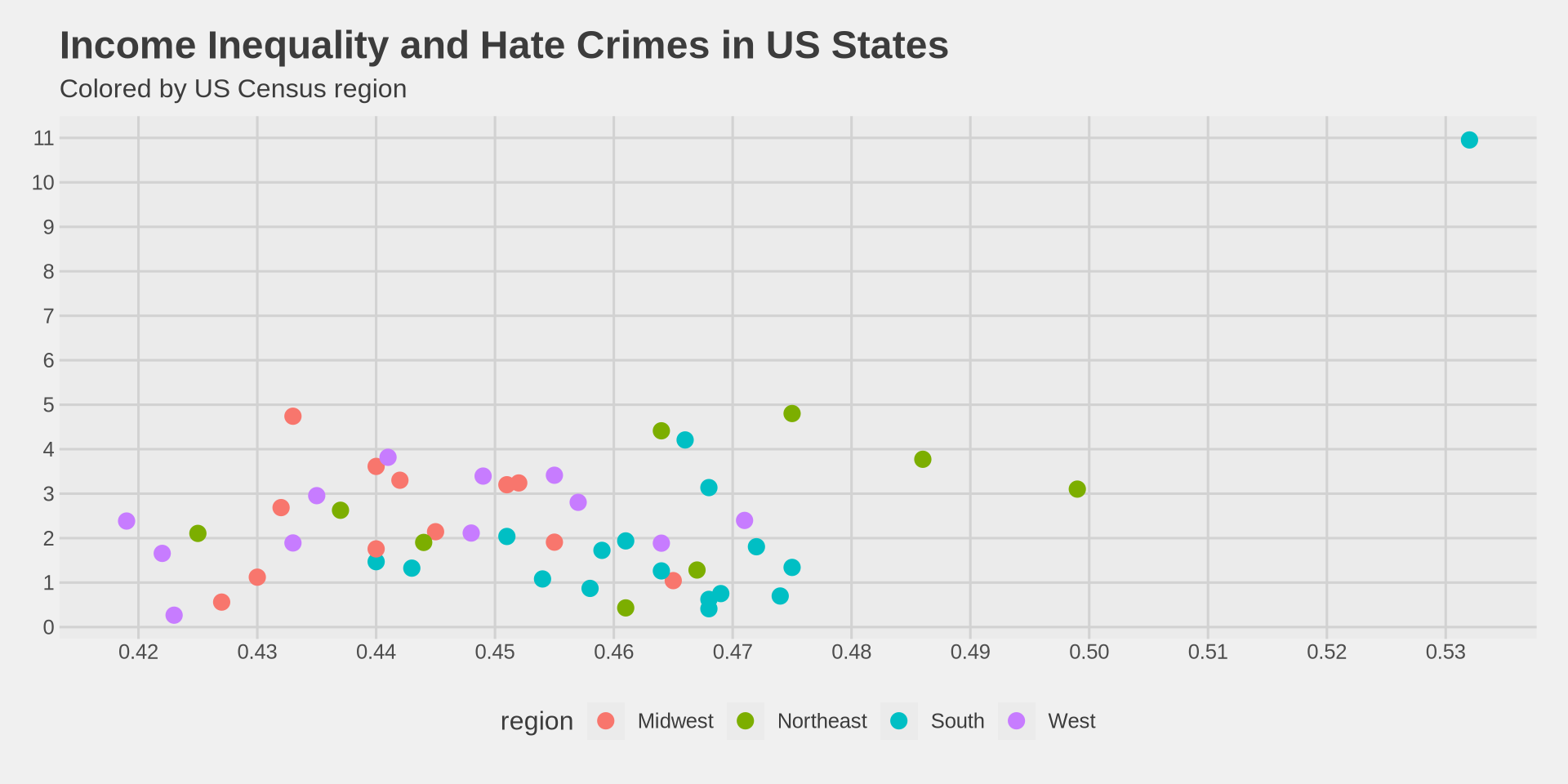
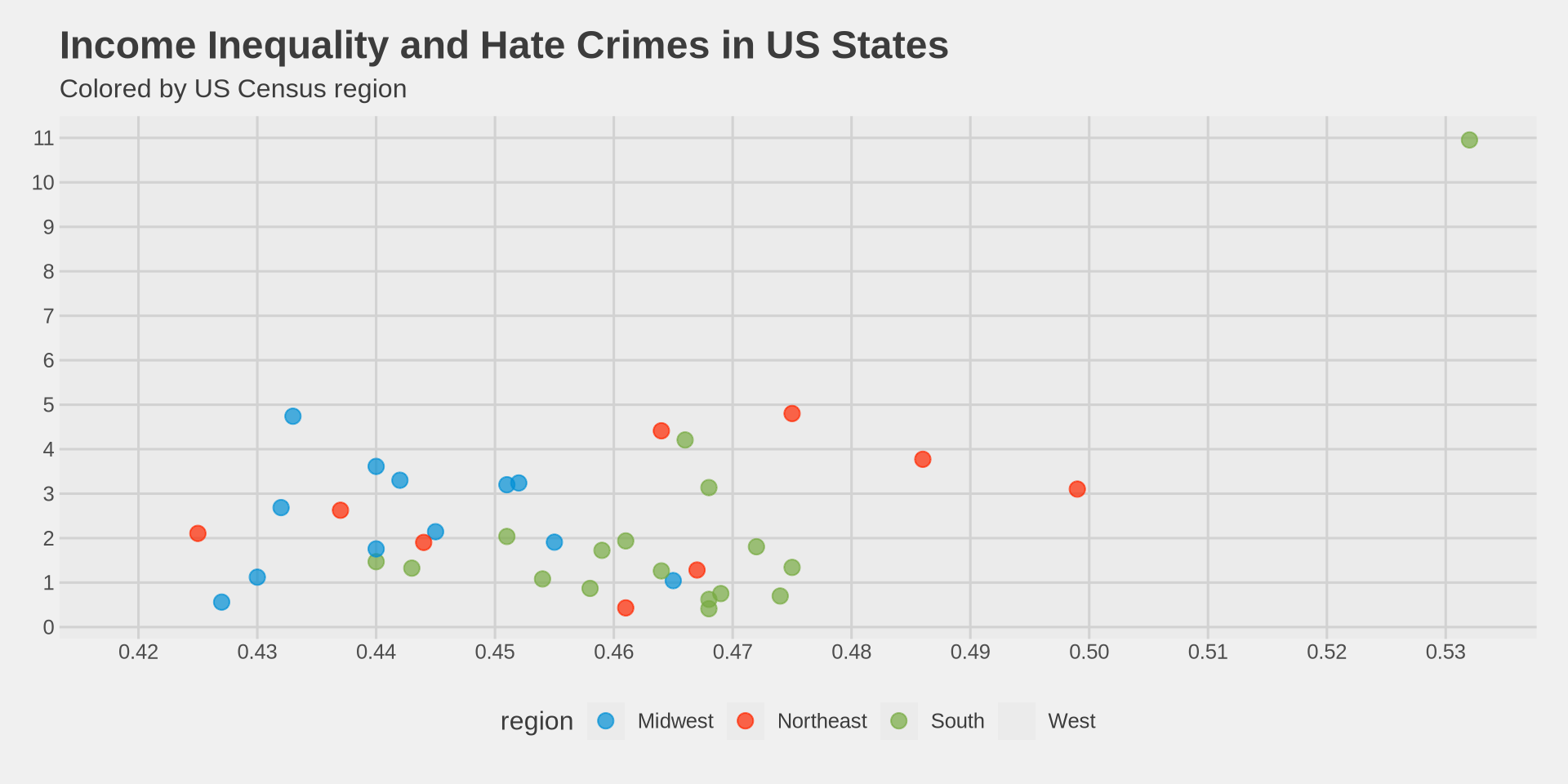
What do we see?

  • The South (red/pink) tends to cluster in the lower-right: high inequality, but lower FBI-reported hate crimes.

  • The Northeast tends to have higher hate crime rates.

  • Does this mean the South has fewer hate crimes? Not necessarily — it could mean different reporting practices across regions.

  • This is an important lesson: correlation does not mean causation, and data quality matters!

Try it yourself!

  • Now it is your turn. Using the same hate_crimes data:

    1. Make a scatter plot of median_income (x axis) vs hate_crimes_fbi (y axis).
    2. Color the points by region.
    3. Add a nice theme.
    4. Add a title and axis labels.
    5. What pattern do you see? Do richer states have more or fewer hate crimes?

Making Points Transparent

The alpha argument

  • Sometimes points overlap and we cannot see how many points are in the same area.

  • We can make points semi-transparent using alpha inside geom_point().

  • alpha = 1 means fully solid (default), alpha = 0 means invisible.

hate_crimes %>%
  ggplot() +
  aes(x = gini_index, y = hate_crimes_fbi, color = region) +
  geom_point(size = 3, alpha = 0.7) +
  scale_x_continuous(n.breaks = 10) +
  scale_y_continuous(n.breaks = 10) +
  labs(
    title = "Income Inequality and Hate Crimes in US States",
    subtitle = "Colored by US Census region",
    x = "Gini Index (Income Inequality)",
    y = "Hate Crimes per 100,000 (FBI)"
  ) +
  theme_fivethirtyeight() +
  scale_color_fivethirtyeight()
Adding a Trend Line

What is a trend line?

  • A scatter plot shows us the individual data points.

  • But sometimes it is hard to see the overall pattern just from the points.

  • A trend line (also called a regression line or line of best fit) helps us see the general direction of the relationship.

  • If the line goes up → positive relationship (as x increases, y increases).

  • If the line goes down → negative relationship (as x increases, y decreases).

  • If the line is flat → no clear relationship.

Adding a trend line with geom_smooth()

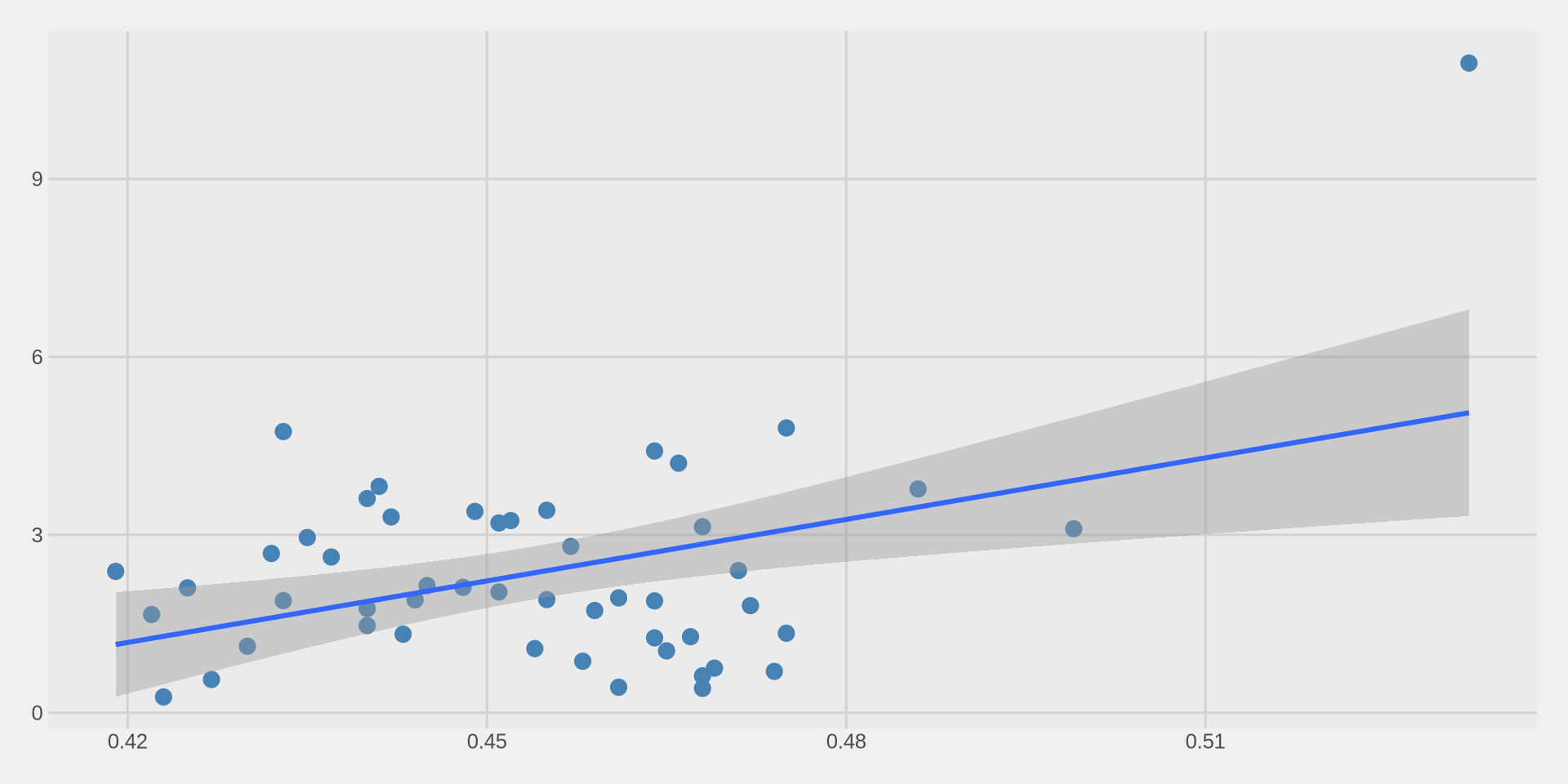
We use geom_smooth() to add a trend line on top of our scatter plot.

We add method = "lm" inside geom_smooth() to get a straight line. lm stands for linear model.
hate_crimes %>%
  ggplot() +
  aes(x = gini_index, y = hate_crimes_fbi) +
  geom_point(size = 3, color = "steelblue") +
  geom_smooth(method = "lm") +
  theme_fivethirtyeight()

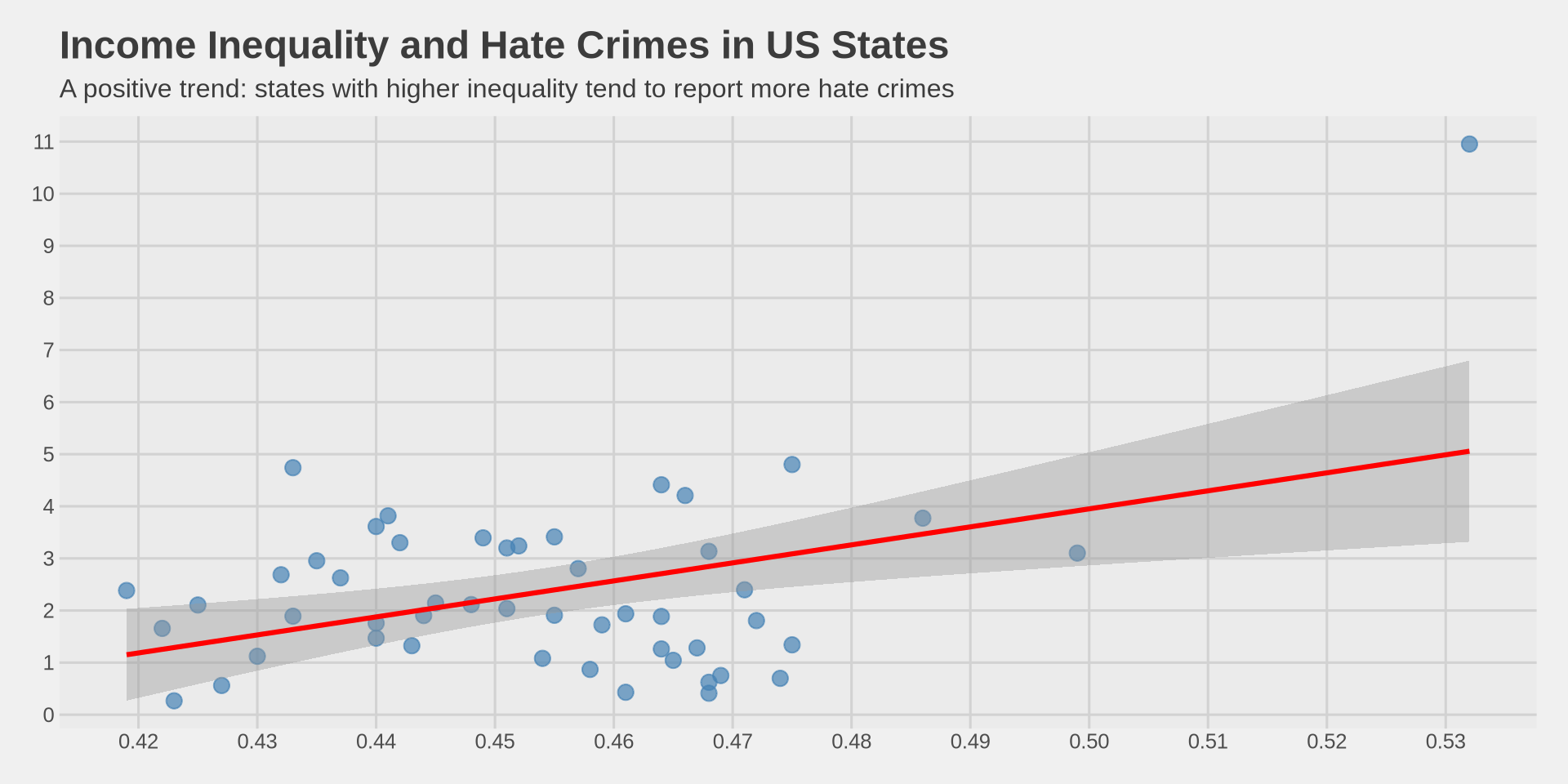
Understanding the trend line

  • The blue line shows the overall trend: as inequality increases, hate crimes tend to increase.

  • The gray shaded area around the line shows the confidence interval — it tells us how uncertain the trend is.

    • A narrow band means we are more confident.
    • A wide band means we are less confident.
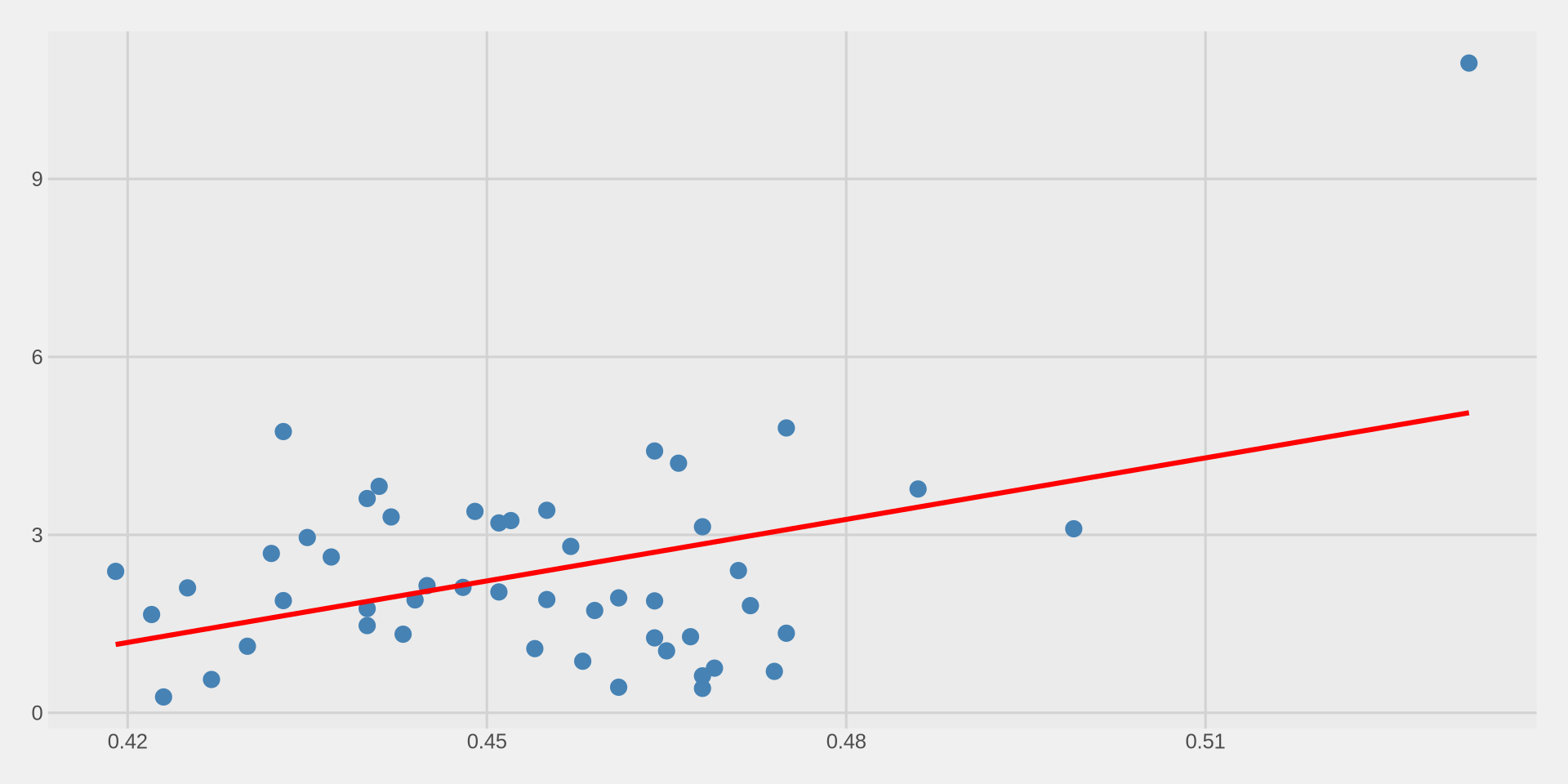
  • We can remove the confidence interval with se = FALSE:
hate_crimes %>%
  ggplot() +
  aes(x = gini_index, y = hate_crimes_fbi) +
  geom_point(size = 3, color = "steelblue") +
  geom_smooth(method = "lm", se = FALSE, color = "red") +
  theme_fivethirtyeight()

Putting it all together

hate_crimes %>%
  ggplot() +
  aes(x = gini_index, y = hate_crimes_fbi) +
  geom_point(size = 3, color = "steelblue", alpha = 0.7) +
  geom_smooth(method = "lm", se = TRUE, color = "red") +
  scale_x_continuous(n.breaks = 10) +
  scale_y_continuous(n.breaks = 10) +
  labs(
    title = "Income Inequality and Hate Crimes in US States",
    subtitle = "A positive trend: states with higher inequality tend to report more hate crimes",
    x = "Gini Index (Income Inequality)",
    y = "Hate Crimes per 100,000 (FBI)"
  ) +
  theme_fivethirtyeight()

Putting it all together

Trend line by group

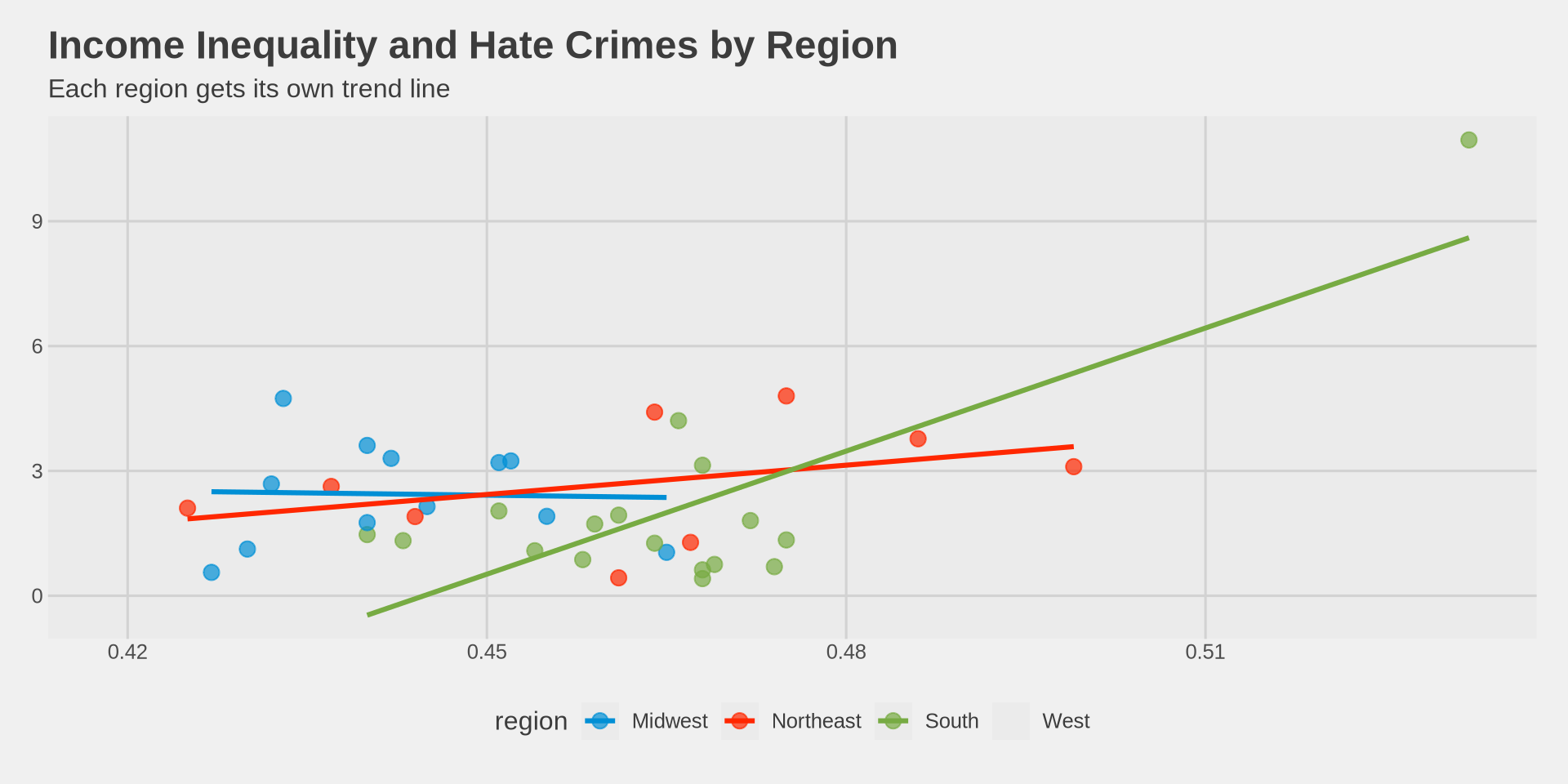
What happens if we add color = region back into aes()?

hate_crimes %>%
  ggplot() +
  aes(x = gini_index, y = hate_crimes_fbi, color = region) +
  geom_point(size = 3, alpha = 0.7) +
  geom_smooth(method = "lm", se = FALSE) +
  labs(
    title = "Income Inequality and Hate Crimes by Region",
    subtitle = "Each region gets its own trend line",
    x = "Gini Index (Income Inequality)",
    y = "Hate Crimes per 100,000 (FBI)"
  ) +
  theme_fivethirtyeight() +
  scale_color_fivethirtyeight()
Trend line by group

  • When color = region is inside aes(), both geom_point() and geom_smooth() split by region.

  • Each region gets its own points and its own trend line.

  • This is useful to see if the relationship is different across groups.

  • The relationship direction varies by region — another reason to be careful about making conclusions!

Summary

What we learned today

  • Scatter plot: shows the relationship between two continuous variables using geom_point().

  • Building a scatter plot:

    1. ggplot() → blank canvas
    2. aes(x = ..., y = ...) → set both axes
    3. geom_point() → add the points
    4. Customize with size, color, alpha
    5. labs() → add title, subtitle, axis labels
  • Color by group: put color = variable inside aes() to color points by a categorical variable.

  • Trend line: geom_smooth(method = "lm") adds a line of best fit.

  • Key takeaway: Correlation does not imply causation! Just because two variables move together does not mean one causes the other.

Exercise

Using the hate_crimes data, explore one of these questions:

  1. Is there a relationship between unemployment and hate_crimes_fbi?
  2. Is there a relationship between highschool (education) and hate_crimes_fbi?
  3. Is there a relationship between median_income and gini_index?

For each:

  • Make a scatter plot with geom_point()
  • Add a trend line with geom_smooth(method = "lm")
  • Color by region
  • Add a title and axis labels
  • Interpret: what does the plot tell you?